Gingerbread Cookies: A Playful Font for Creative Designs and Cutting Machines
When you think of Gingerbread Cookies, you might imagine the warm, spiced treats that fill homes during the holiday season. But in the world of design, Gingerbread Cookies represents something equally delightful—a whimsical, artistic font that brings charm and personality to a wide range of creative projects. Whether you are designing a children's book, crafting invitations, or working with cutting machines like Cricut, this font offers unique possibilities that blend functionality with playfulness.
In this article, we’ll explore what Gingerbread Cookies is, its key features and characteristics, where it shines, and who can benefit most from using it. We’ll also discuss practical considerations, including compatibility with design software, so you can decide if it’s the right choice for your next project.
What Is the Gingerbread Cookies Font?
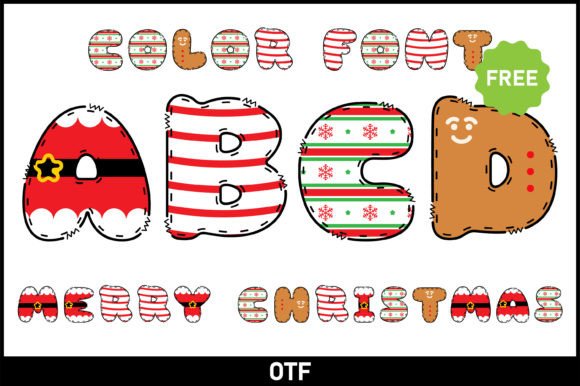
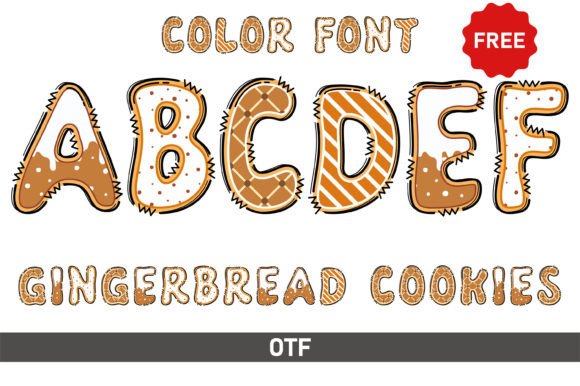
Gingerbread Cookies is a decorative display font designed to evoke a sense of fun, warmth, and creativity. Its letterforms are often characterized by uneven strokes, playful curves, and a hand-drawn quality that makes it feel approachable and personal. Unlike more formal typefaces, Gingerbread Cookies embraces imperfection—each character carries a sense of movement and spontaneity that is hard to replicate with standard fonts.
This font is particularly popular among designers and hobbyists who want to inject personality into their work. It falls into the category of "whimsical fonts," which are often used in designs that aim to convey a playful or artistic feel, such as children’s books, posters, invitations, greeting cards, and more. For instance, children’s books often utilize fonts that are whimsical, colorful, and easy to read, creating an engaging reading experience for young audiences. Gingerbread Cookies fits this brief perfectly.
Playful and Artistic Aesthetic
The most defining feature of Gingerbread Cookies is its ability to make any design feel lively and approachable. Whether you’re working on a birthday invitation or a promotional poster for a family-friendly event, this font adds a layer of warmth that standard sans-serif or serif fonts cannot match. Its irregular letter spacing and varied stroke widths give it a handcrafted feel that resonates with audiences looking for authenticity.
Color and Black Versions
One of the standout aspects of Gingerbread Cookies is that it comes in both color and black versions. The color version allows you to use multi-hued letterforms directly in your designs, which is perfect for projects where you want to avoid the extra step of coloring each letter individually. However, it is important to note that the color version is only compatible with certain design programs, including Adobe Photoshop, Adobe Illustrator, Silhouette Studio, and Inkscape. The OTF and TTF files of the color version are not compatible with Cricut Design Space.
The black version of Gingerbread Cookies, on the other hand, is fully compatible with Cricut Design Space and other cutting machines. This makes it an excellent choice for crafters who want to create vinyl decals, custom apparel, or papercraft projects without worrying about software limitations.
File Formats and Compatibility
When you download Gingerbread Cookies, you typically receive OTF (OpenType) and TTF (TrueType) files. These are standard font formats that work across most operating systems and design software. However, as mentioned, the color version requires specific programs to render the multi-colored glyphs correctly. For more details on how to use this type of font, you can refer to the Ultimate Font Guide provided by the font creator, which covers installation, troubleshooting, and best practices.
Where Can You Use Gingerbread Cookies?
The versatility of Gingerbread Cookies makes it suitable for a wide range of applications. Below are some of the most common use cases, along with real-world examples.
Children’s Books and Educational Materials
Because Gingerbread Cookies is both whimsical and readable, it is a strong candidate for children’s book layouts. Imagine a story about a mischievous gingerbread man running through a village—the font itself can mirror the playful energy of the narrative. Teachers and educational content creators can also use it for worksheets, flashcards, and classroom decorations that need to capture a child’s attention without sacrificing legibility.
Invitations and Greeting Cards
Birthday parties, baby showers, holiday gatherings, and other celebrations benefit from fonts that set a joyful tone. Gingerbread Cookies works beautifully on invitations, RSVP cards, and thank-you notes. Its hand-drawn quality makes each piece feel personalized, as if it were crafted by hand rather than printed from a template.
Posters and Signage
For events like school fairs, community markets, or art exhibitions, Gingerbread Cookies can add a playful touch to posters and banners. It pairs well with bright colors and simple graphics, helping the text stand out while maintaining a friendly vibe. Business owners who run cafes, toy stores, or creative studios might also use this font for window displays or menu boards to reinforce a warm brand identity.
Craft Projects with Cutting Machines
The black version of Gingerbread Cookies is a favorite among Cricut and Silhouette users. You can use it to create custom vinyl decals for laptops, mugs, or wall art. It also works well for scrapbooking, card making, and fabric iron-on transfers. Because the black version is a standard font file, you can resize and manipulate it freely in Design Space without encountering compatibility issues.
Social Media Graphics and Digital Content
If you create content for Instagram, Pinterest, or YouTube, Gingerbread Cookies can help your thumbnails and posts stand out. It is especially effective for quotes, announcements, or seasonal promotions. The color version is particularly handy for digital designs where you want instant visual impact without manual coloring.
Who Can Benefit from Using Gingerbread Cookies?
This font appeals to a broad audience, from professional graphic designers to hobbyist crafters. Here is a breakdown of who might find it especially valuable:
- Graphic Designers: Those working on branding projects for family-oriented businesses or creative clients can use Gingerbread Cookies to inject personality into logos, packaging, and marketing materials.
- Event Planners: Whether you are organizing a wedding, a birthday party, or a corporate event with a casual theme, this font can unify your printed materials and decorations.
- Teachers and Educators: Creating engaging classroom materials becomes easier with a font that feels fun yet clear. Gingerbread Cookies is great for worksheets, bulletin boards, and reward charts.
- Small Business Owners: Retailers, restaurant owners, and service providers can use this font in signage, menus, and promotional flyers to create a memorable brand experience.
- Crafters and Hobbyists: If you enjoy DIY projects with cutting machines, Gingerbread Cookies opens up possibilities for personalized gifts, home decor, and party favors.
Strengths
- Unique Personality: Few fonts capture a playful, hand-drawn feel as effectively as Gingerbread Cookies. It helps designs stand out in a crowded visual landscape.
- Dual Versions: The availability of both color and black versions gives you flexibility depending on your software and project requirements.
- Cricut Compatibility: The black version works seamlessly with cutting machines, making it a reliable choice for physical crafts.
- Seasonal and Year-Round Use: While it has a festive vibe, Gingerbread Cookies can be used for non-holiday projects as well, thanks to its general whimsical nature.
Considerations and Limitations
- Software Restrictions for Color Version: If you rely heavily on Cricut Design Space, you will need to use the black version. The color version is limited to programs like Photoshop, Illustrator, Silhouette, and Inkscape.
- Not Suitable for Formal Contexts: Because of its playful design, Gingerbread Cookies is not appropriate for corporate reports, legal documents, or other formal communications.
- Legibility at Small Sizes: The irregular strokes and playful spacing can make the font harder to read when used in very small sizes. It works best for headlines, titles, and short text blocks rather than lengthy paragraphs.
- Learning Curve for Color Features: If you are new to using color fonts, you may need to consult the Ultimate Font Guide to understand how to enable and manipulate the color glyphs in your chosen software.
Practical Expectations and Guidance
When using Gingerbread Cookies, keep a few practical tips in mind to get the best results:
- Pair with Neutral Fonts: Because Gingerbread Cookies is highly decorative, it pairs well with simple sans-serif or serif fonts for body text. This creates a balanced hierarchy in your design.
- Test Print Before Finalizing: If you are using the color version for print projects, always test a sample to ensure the colors render correctly on your printer and paper type.
- Use the Correct File for Your Software: Double-check whether your design program supports color fonts. For Cricut users, stick with the black version to avoid frustration.
- Scale for Impact: Use Gingerbread Cookies at larger sizes where its details can be appreciated. Avoid using it for body text or small captions.
- Explore the Ultimate Font Guide: If you run into technical issues or want to unlock the full potential of the font, the guide provides step-by-step instructions tailored to different software.
Real-World Scenarios and Applications
To illustrate the versatility of Gingerbread Cookies, here are a few scenarios where it truly shines:
- Scenario 1 – Holiday Marketing Campaign: A bakery wants to promote its seasonal gingerbread cookies. They use the color version of Gingerbread Cookies in an Instagram post, pairing it with warm brown and red tones. The font’s playful lettering echoes the homemade quality of the cookies, driving engagement and foot traffic.
- Scenario 2 – Classroom Reading Chart: A first-grade teacher creates a reading progress chart using the black version of Gingerbread Cookies. The font’s friendly appearance motivates students, and the teacher can easily cut out letters with a Cricut machine to decorate the classroom.
- Scenario 3 – Custom Birthday Banner: A parent designs a “Happy 5th Birthday” banner for a child’s party. Using Gingerbread Cookies in Cricut Design Space, they cut each letter from colorful cardstock and string them together. The result is a one-of-a-kind decoration that matches the party’s whimsical theme.
- Scenario 4 – Children’s Book Title Page: An indie author self-publishes a picture book about forest animals. They choose Gingerbread Cookies for the title page to instantly convey the playful, gentle tone of the story. The font complements the hand-drawn illustrations perfectly.
Is Gingerbread Cookies Right for Your Project?
Choosing the right font comes down to understanding your audience, your medium, and the emotional tone you want to convey. Gingerbread Cookies is an excellent choice if your project calls for warmth, creativity, and a sense of fun. It works best in contexts where you want to stand out and connect with viewers on a personal level.
However, if your project requires strict professionalism, high legibility at small sizes, or compatibility across all design platforms without extra steps, you may want to consider a more standard typeface. For everyone else—designers, crafters, educators, and small business owners—Gingerbread Cookies offers a unique tool that can elevate your work and delight your audience.
By understanding its features, limitations, and ideal use cases, you can make an informed decision and get the most out of this delightful font. Whether you are creating a children’s book, a party invitation, or a custom vinyl decal, Gingerbread Cookies brings a touch of handmade charm that is hard to beat.