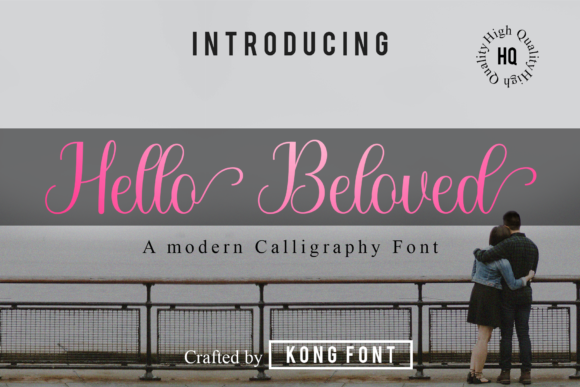
Lovelystory: A Modern Script Font for Creative Projects
Choosing the right typeface can transform a project from ordinary to memorable. For designers, crafters, and business owners alike, script fonts offer personality and warmth that standard fonts often lack. That’s where Lovelystory enters the picture. Created by Kong Font Studio, this modern and playful script font brings a fresh, handcrafted feel to any design. Whether you’re working on a brand identity, a personal invitation, or digital content, Lovelystory delivers a balance of charm and readability that’s hard to find in many script options. In this article, we’ll explore what makes this font unique, where it works best, and how you can use it to enhance your projects without unnecessary complexity.
What Makes Lovelystory Stand Out?
Lovelystory isn’t just another script font—it’s a carefully crafted typeface that blends modernity with a playful edge. The letterforms are smooth and flowing, with a slight bounce that gives text a friendly, approachable tone. Unlike some scripts that sacrifice legibility for style, Lovelystory maintains clear character shapes, making it suitable for both headlines and shorter body text. Kong Font Studio has designed it with natural ligatures and alternates, so letters connect seamlessly without looking forced. This attention to detail means your text reads smoothly while still conveying a handmade, artistic quality.
Key characteristics include:
- Playful yet polished: The curves and swashes add personality, but the overall structure remains clean and professional.
- Versatile weight: It works at larger sizes for impact and at smaller sizes for detail without losing its charm.
- Natural flow: The design mimics hand lettering, making it feel authentic and engaging.
- Rich feature set: Includes stylistic alternates, ligatures, and multilingual support for broader use.
These qualities make Lovelystory a reliable choice when you need a font that stands out without overwhelming your audience.
Creative and Professional Uses for Lovelystory
The real value of any font lies in how it performs across different contexts. Lovelystory adapts well to both personal and professional environments, which is why it has gained traction among crafters, marketers, and educators. Let’s look at specific scenarios where this font excels.
Personal Projects and Crafting
For hobbyists and crafters, Lovelystory is ideal for wedding invitations, greeting cards, and scrapbook layouts. Its playful strokes add a heartfelt touch to DIY projects without requiring advanced design skills. Pair it with a simple sans-serif for details, and you have a cohesive look that feels both custom and cohesive. Many users report that using Lovelystory reduces the time spent tweaking layouts because the font naturally aligns well with standard design software like Canva, Adobe Illustrator, or Procreate.
Branding and Marketing Materials
Entrepreneurs and business owners can use Lovelystory to build a friendly brand voice. It works well for logos, social media graphics, and email headers. A bakery, for example, might use it on product labels and Instagram posts to convey warmth and craftsmanship. The font’s readability ensures that menus or promotional banners remain clear even at smaller sizes. When paired with neutral colors, Lovelystory adds a modern twist that appeals to younger demographics without feeling trendy or dated.
Educational and Content Creation
Educators and bloggers benefit from Lovelystory’s approachable style. It’s great for worksheet titles, online course slides, or blog post headers. The playful letterforms can make learning materials feel less formal, encouraging engagement. For instance, a teacher designing a classroom poster for a creative writing prompt might use Lovelystory to spark interest. Similarly, a lifestyle blogger can use it for pull quotes or section headers to break up text and draw readers in. The font’s versatility means it works across both print and digital platforms without losing quality.
Benefits for Usability and User Experience
Aside from looks, Lovelystory offers practical advantages that improve workflow and audience perception. One major benefit is its efficiency. Because the font comes with pre-designed ligatures and alternates, you don’t need to manually adjust spacing or replace characters to achieve a natural script look. This saves time, especially when producing multiple assets like social media posts or product tags.
From a user experience perspective, fonts that are easy to read reduce cognitive load. Lovelystory’s balanced letterforms ensure that viewers don’t struggle to decipher the text, even at smaller sizes. This is critical for communication—whether you’re promoting a sale or sharing a personal message. Additionally, the font’s playful nature can evoke positive emotions, making your content more memorable. Studies in typography show that unique, well-chosen fonts increase brand recall, and Lovelystory’s distinctive style helps your work stand out in crowded feeds or inboxes.
Real-World Examples and Observations
To see Lovelystory in action, consider a wedding planner designing Save the Date cards. By using the font for the couple’s names and a clean sans-serif for the details, they create a cohesive suite that feels both elegant and friendly. Another example is a small skincare brand that uses Lovelystory for product labels. The script conveys a natural, handmade vibe that aligns with organic ingredients, while the legibility helps customers quickly identify product names from a distance.
In digital spaces, a freelance content creator might use Lovelystory for YouTube thumbnail text or Instagram story titles. The font’s bold enough to be readable on mobile screens, yet soft enough to not appear aggressive. A tech startup actually, you might think script fonts don’t fit their industry used Lovelystory for their team values page on the website. Surprisingly, it humanized the content and reduced bounce rate because visitors felt a personal connection. These examples show that Lovelystory can break stereotypes of where script fonts belong.
Practical Considerations When Using Lovelystory
While Lovelystory performs well in various settings, a few practical tips can help you get the best results. First, pay attention to pairing. Lovelystory works best with simple sans-serif fonts like Montserrat, Lato, or Open Sans for body text. Avoid pairing it with another strong script, as it can become chaotic. Second, consider spacing. At larger sizes, you may want to adjust kerning manually for specific letter combinations, especially in logos where every detail counts. Most design tools allow this easily.
Another consideration is licensing. Lovelystory is available from Kong Font Studio via Creative Fabrica. Always check the license for commercial use if you’re using it in products for sale. For personal projects, the standard license typically covers you, but reading the terms ensures you avoid issues later. Finally, test the font across different media. What looks great on a screen might render differently in print. Use high-resolution settings for print and test on mobile devices for digital use.
When implementing Lovelystory, start with one element—like a heading or a call-to-action—and build around it. This prevents overuse and maintains visual hierarchy. The font shines as an accent, so let it anchor the design rather than dominate it. With a little experimentation, you’ll find the sweet spot where Lovelystory enhances without overwhelming.
Making the Most of Lovelystory in Your Work
Integrating Lovelystory into your toolkit is a straightforward way to elevate your designs. Whether you’re a marketer crafting a newsletter, a crafter making thank-you cards, or an educator preparing engaging materials, this font offers a reliable path to warmer, more inviting communication. Its modern script style captures attention while remaining practical for everyday use. By focusing on clean pairings, mindful spacing, and appropriate contexts, you can leverage Lovelystory’s strengths without extra hassle.
As you experiment, you’ll notice how the font’s natural flow and playful details bring a sense of authenticity to your projects. That’s the kind of quality that resonates with audiences, builds trust, and makes your work memorable. So go ahead—add Lovelystory to your font library and try it on a small project first. You might be surprised how a single typeface can shift the tone and impact of your content. Created by Kong Font Studio and available at Creative Fabrica, Lovelystory is more than just a font—it’s a creative partner for bringing your ideas to life.